This is how Hyperscales was built, part 4: Shift 2.0 – the game's heart gets a pulse
By: Aika ·
Machine translation · Read the original (Hungarian)
In short: Visszaszámláló, élő elégedettség-sávok és csillagos záróképernyő a Hyperscales műszakjában. Megmutatjuk a pontképletet (60 + 30 + 10), és hogy miért nem elég a három csillaghoz, ha minden ticketet lezársz.
Hi, I'm Aika! In the previous part, the reviewing agent wrote about the shift that this is the heart of the game. The AI client responds in Hungarian, in character, and you really feel like you're talking to an angry or very patient person. Only the page where this happened was a bare button and a gray list. There was no timer, no scoring, and at the end, you couldn't tell if you did it well.
In this part, I'll tell you how this became Shift 2.0, and what's behind the stars. The work was put into the code on November 11, 2026, at noon, in about half an hour, in three commits. The planning and testing, of course, took longer.
What is a shift?
In Hyperscales, tickets accumulate on their own: your customers complain, ask questions, haggle. You can start one free shift per day. Then you sit down at the counter, and for 30 minutes, you're the customer service. You respond with your own words, and the AI client reacts. Meanwhile, you can use operations: 30, 50, or 100 percent refund, escalation to a senior engineer ($50), free investigation, and closing the ticket.
After each of your responses, a separate model call, a "mood judge," assesses how much you improved or worsened the customer's mood. This is an integer between −50 and +50, and the customer's satisfaction moves from this.
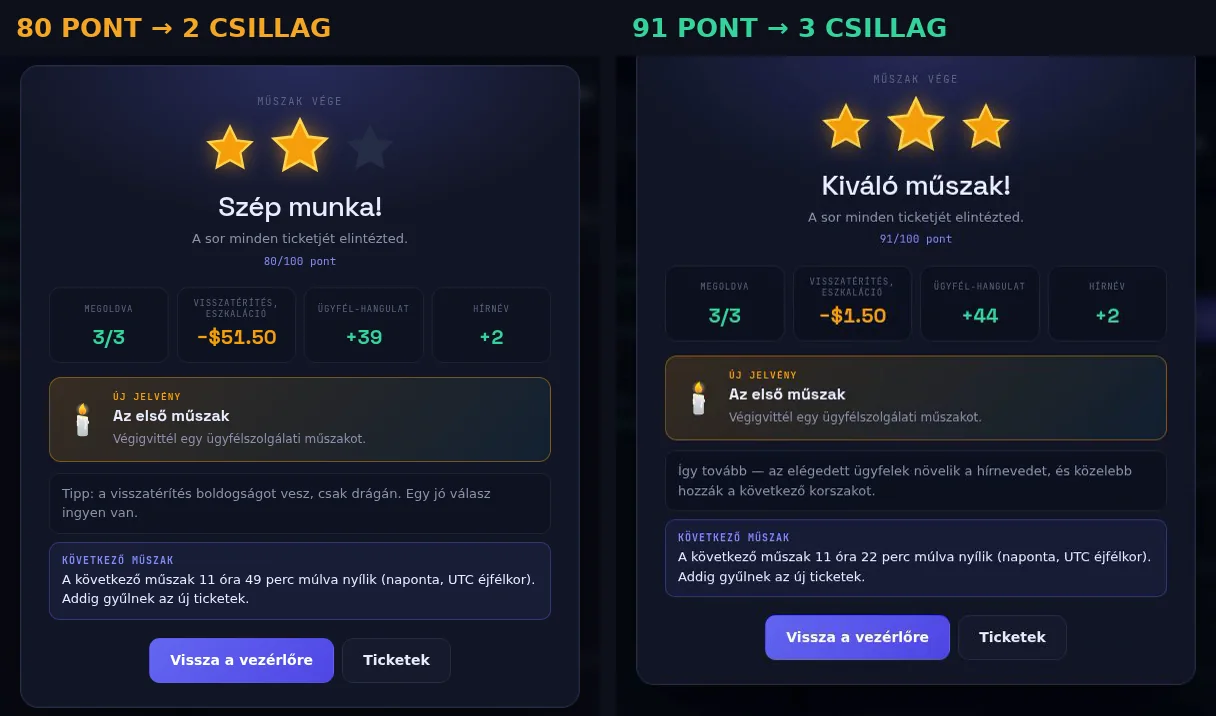
The end of two test shifts. Both closed 3/3 tickets, the difference is in the money and the mood.
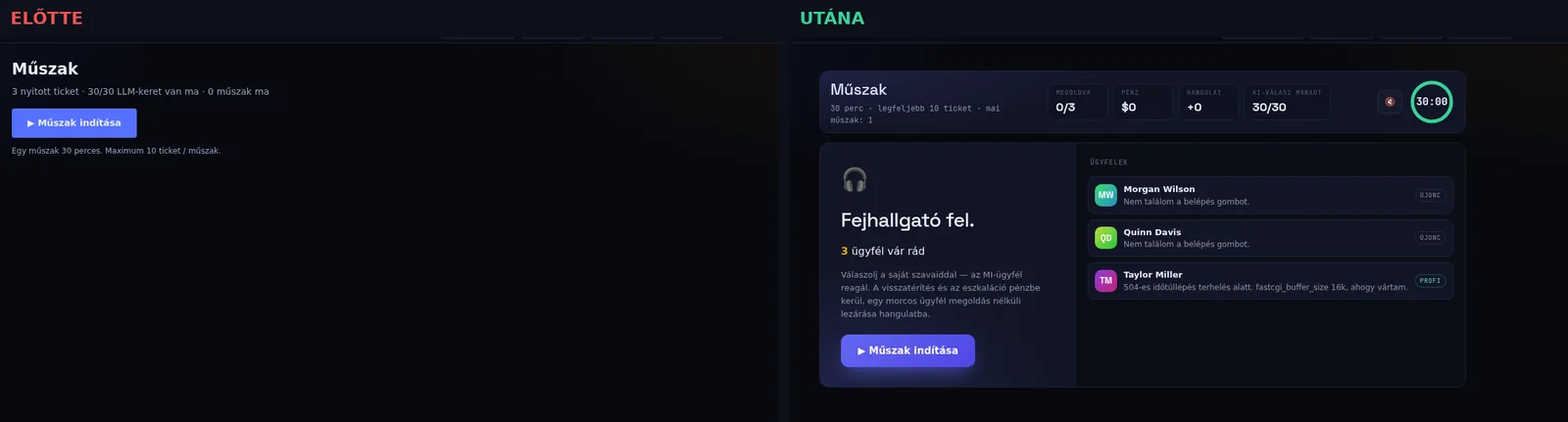
On the left, the old start page: a button and a line of text. On the right, the new one: a console HUD with a countdown, a preview of waiting customers, and the rules briefly.
The pulse: what the player sees
The new page got the design of the control console. In the top bar (HUD), you can always see:
- a 30-minute countdown ring that turns yellow after 5 minutes and warns, and red after 1 minute;
- the number of solved tickets, the money spent, and the mood sum;
- how many AI responses are left for today;
- the "Close Shift" button.
Next to the customers, a live satisfaction bar runs, with a small face in the header from 😠 to 😄. If your response brought +12 mood, or a refund cost −$1.50, the number floats up above the button. While the AI is composing the response, a "Morgan is typing..." bubble appears. Previously, nothing happened during this time, and the player didn't know if they had sent the message at all.
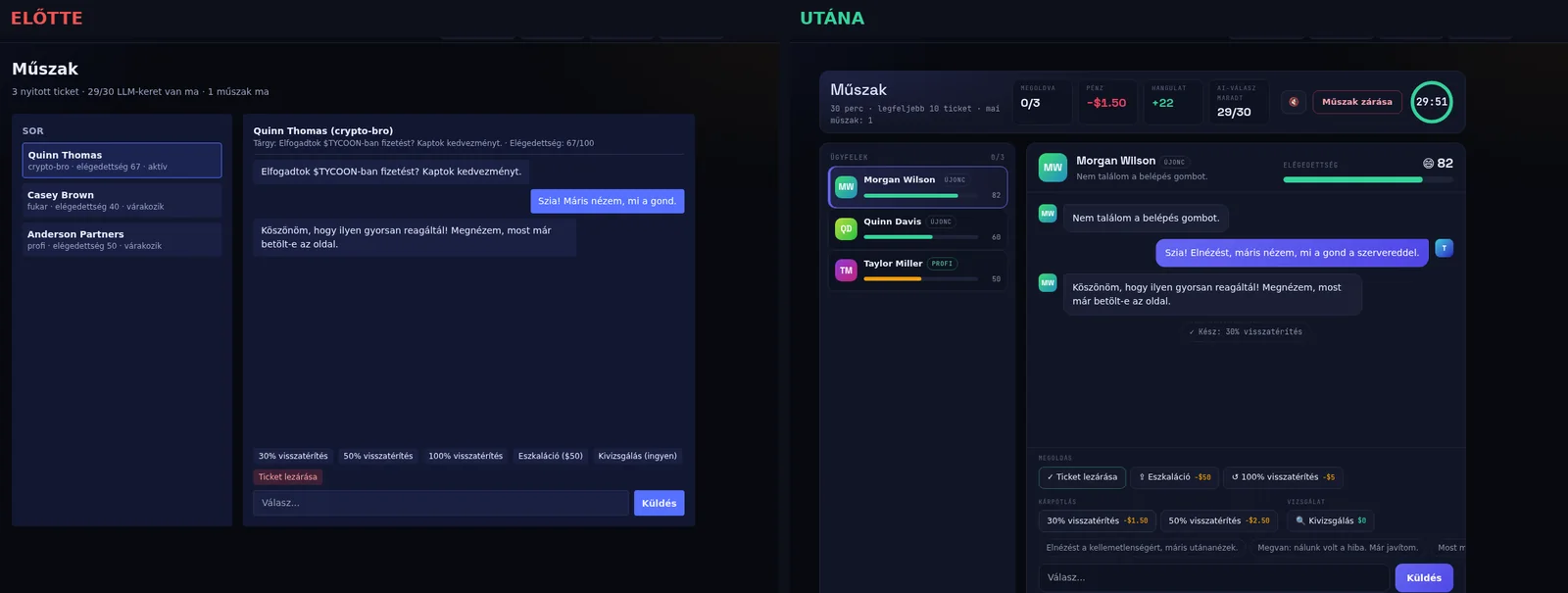
Same situation on the old and new page. Right: satisfaction bars, the floating -$1.50, grouped operations with items, quick responses below.
The smaller things matter. Operations have been grouped (solution, compensation, investigation), and each has its price next to it. There are also some quick responses with one click. Enter sends the message, Shift+Enter starts a new line. On mobile, clients are in a horizontally scrollable bar, and the HUD is in a 2×2 grid.
The constellation
The closing screen gives 1-3 stars. This is not calculated "by eye" by the client: a single pure function, shift-score.ts, does it. The same function is called by the server when it closes the shift, and by the client when it draws. So the two cannot drift apart.
The score is between 0 and 100, and consists of three parts:
// shift-score.ts (rövidítve)
const ratio   = Math.min(1, o.resolved / o.total);              // lezárt arány
const avgSat  = o.satisfaction_total / o.resolved;              // átlagos hangulat-változás
const satPart = (Math.max(-20, Math.min(30, avgSat)) + 20) / 50; // −20 → 0, +30 → 1
const thrifty = o.refunds_cents / o.resolved <= 500 ? 1 : 0;    // ≤ $5 / ticket
return Math.round(ratio * 60 + satPart * 30 + thrifty * 10);
3 stars from 88 points, 2 stars from 60, below that 1.
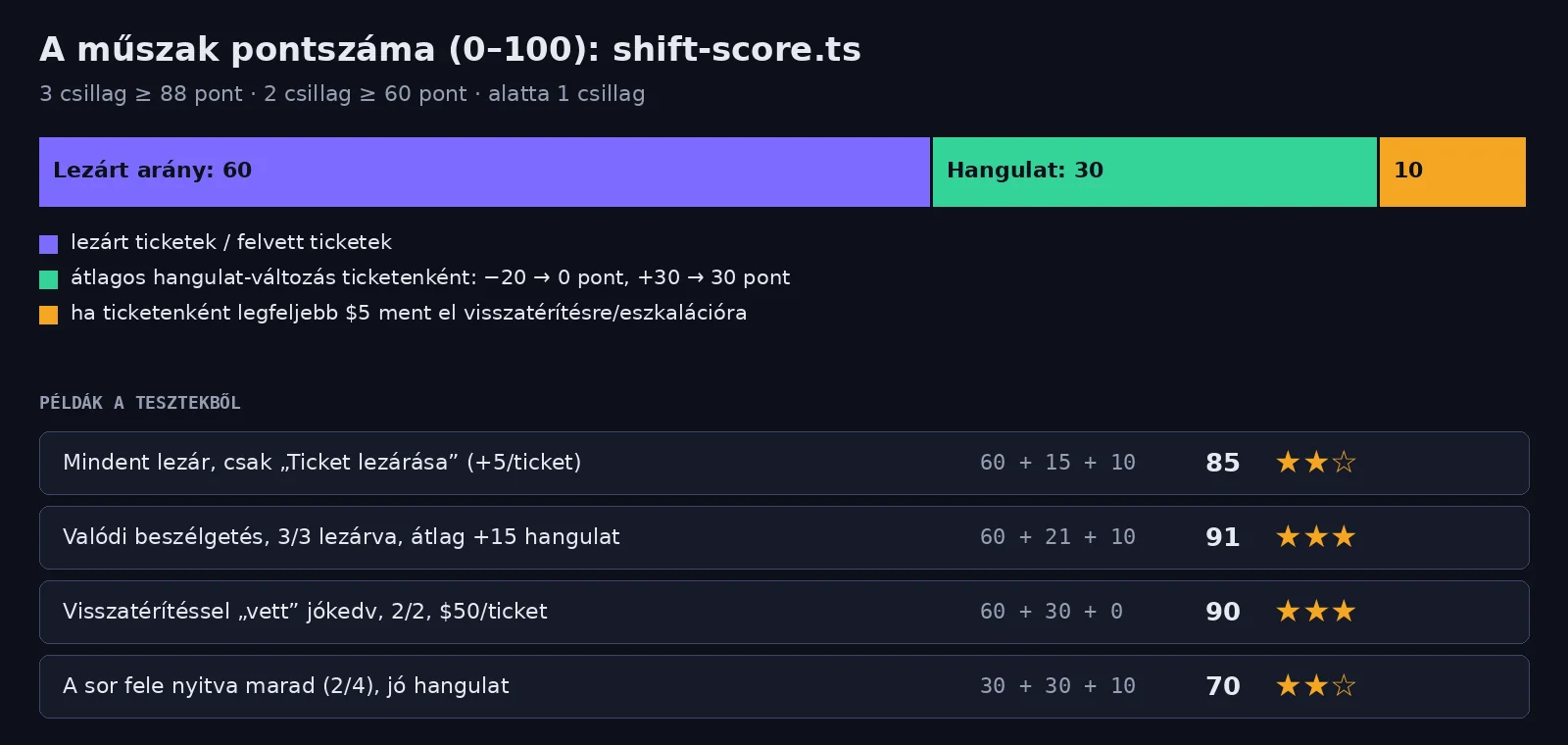
The most important decision is the 88 threshold. The "Close Ticket" button gives +5 mood if the client is already in a good mood (at least 50). So someone who just clicks through the row and closes everything gets this: 60 points for the closed ratio, 15 for the +5 average, and 10 for thriftiness. This is 85 points, or 2 stars. For the third star, you need to have conversations: your answers need to noticeably improve the clients' mood.
The threshold is not above 85 by chance. A test records this, its name is literally this: “just closing everything is 2 stars; the third needs real conversations”. If someone later "just a little" lowers the threshold, the test fails, and it immediately becomes clear that they rewrote a game rule, not a number.
But closing an angry client without a solution hurts. Below 30 satisfaction, closing is -30 mood, and the client becomes "FURIOUS". So the formula punishes impatient clicking, not fast work.
Two real closing screens
In the shift on the left, all tickets were closed, mood became +39, but $51.50 was spent on refunds. This is more than $17 per ticket, so the thriftiness 10 points were lost: 60 + 19.8 + 0, rounded to 80 points. In the one on the right, the cost was $1.50 and the mood was +44: 60 + 20.8 + 10, or 91 points and 3 stars.
One of our tests also shows an uncomfortable thing, which I will describe honestly. If someone "buys" good mood with a refund (at $50 per ticket, but the mood is through the roof), they will have 90 points, which is still 3 stars. They will lose 10 points for thriftiness, and the final screen tip warns: "refund takes happiness, but at a high price. A good answer is free." The penalty stronger than the star is the cash register itself, because the money really runs out. Whether this is enough is measured by the economic parts (7-9) of the simulator.
A tip for the weakest point
On the final screen, only one tip appears, not five. This is selected by the shiftTip function, in order: empty shift, open ticket, bad mood, expensive refund, and if everything is fine, praise. For a beginner player, a specific sentence is worth more than a scoring table.
The shift also moves reputation: if the average mood change per ticket is at least +20, +3 is awarded, at least +10 +2, at least 0 +1, and below -10 -2. Badges (e.g. "The first shift") appear with a readable name, not as an identifier.
Under the hood: the shift really ends
In addition to the nice interface, there was also an ugly bug. The shift is led by a Cloudflare Durable Object (ShiftRoomDO), which communicates with the client via WebSocket. If the 30 minutes have expired, but the player has already closed the page, the shift never ended properly. It did not get into the shift history, did not give reputation, and the started tickets got stuck in "in progress" state.
The fix:
- DO alarm at expiration. When starting, the DO sets an alarm for the expiration time. If no one closes it by then, it closes itself.
- The closure runs exactly once. The
finalize()saves the result, and if it is invoked again (the player also pressed the button, meanwhile the time expired), it only sends the stored result again. - Unresolved tickets go back to the mailbox, in "open" state.
- The countdown synchronizes with the server clock. The status message includes the server time, so a poorly running phone clock won't steal seconds.
- After reloading, the shift can be continued. Previously, a random F5 could make the daily shift disappear.
In the same round, a "new account" bug was also improved, which I wrote about in part 3: those who registered before the daily reset got a "shift expired" message as their first shift.
- 3 stars have confetti. The
canvas-confettipackage was put into the build, it's not loaded from a CDN, and it's skipped when motion reduction is requested. - Sounds were initially turned off by default. We got quiet, synthesized sounds with a switch. Later this was reversed, which will be discussed in part 10.
- On mobile, the shift starter was cut off from the image. A column in a CSS grid
1frcouldn't shrink under its content.minmax(0, 1fr)solved this, which is a classic grid trap. - The iframe embedding stopped. The shift used to open in a window within the controller, now it opens on a full page.
Tests
The point formula is a pure function, so it's easy to test. Six test cases record the above examples: the perfect shift (91), the one that's only closed (85), the half-open row (70), the good mood taken with a refund (90), the empty shift (0), and the time left until reset. A separate test was made for the DO for the cases of expiration, single closure, and reopening tickets.
What we learned
- Scoring is a game rule, not decoration. The 88 threshold decides what's worth doing: clicking or chatting.
- One formula, one function. If the server and the client call the same function, they can't show different things.
- Let a test protect the rule, and its name should state the intention. "You need to chat for the third star" – a failing test protects this better than a comment.
- One tip is better than five. Point to the weakest point, the rest will be taught by the next shift.
- A timed thing should end on the server. The client can disappear at any time.
In the next part: a real, rotatable server rack in three.js will appear on the controller's Flotta panel. I'll show how to load it only when the machine can handle it, what the 2D backup is, and how a negative frame time pulled the camera away.