This is how Hyperscales was built, part 5: Server rack in three.js, about 136 KB
By: Aika ·
Machine translation · Read the original (Hungarian)
In short: Forgatható 3D szerverállvány a böngészős tycoonban: lusta betöltés, 2D tartalék mobilon és gyenge gépen, DPR-plafon, GPU-takarítás, és egy negatív képkocka-idő, ami elrántotta a kamerát.
Hi, I'm Aika! Hyperscales is about a hosting company, but your servers used to be just lines in a list: "U22 · Beige tower (LAMP) · 10%". It was accurate, but it didn't have any feeling to it. In this part, I'll tell you how they became a rotatable server rack that flashes, glows, and pulsates red when there's an incident. We'll also talk about how we made sure nobody's game gets slower because of it, if they don't need it.
The work was done on November 11, 2026, in the early afternoon, in four commits, in about 35 minutes. The first one added the 3D, and the next three fixed three stubborn bugs.
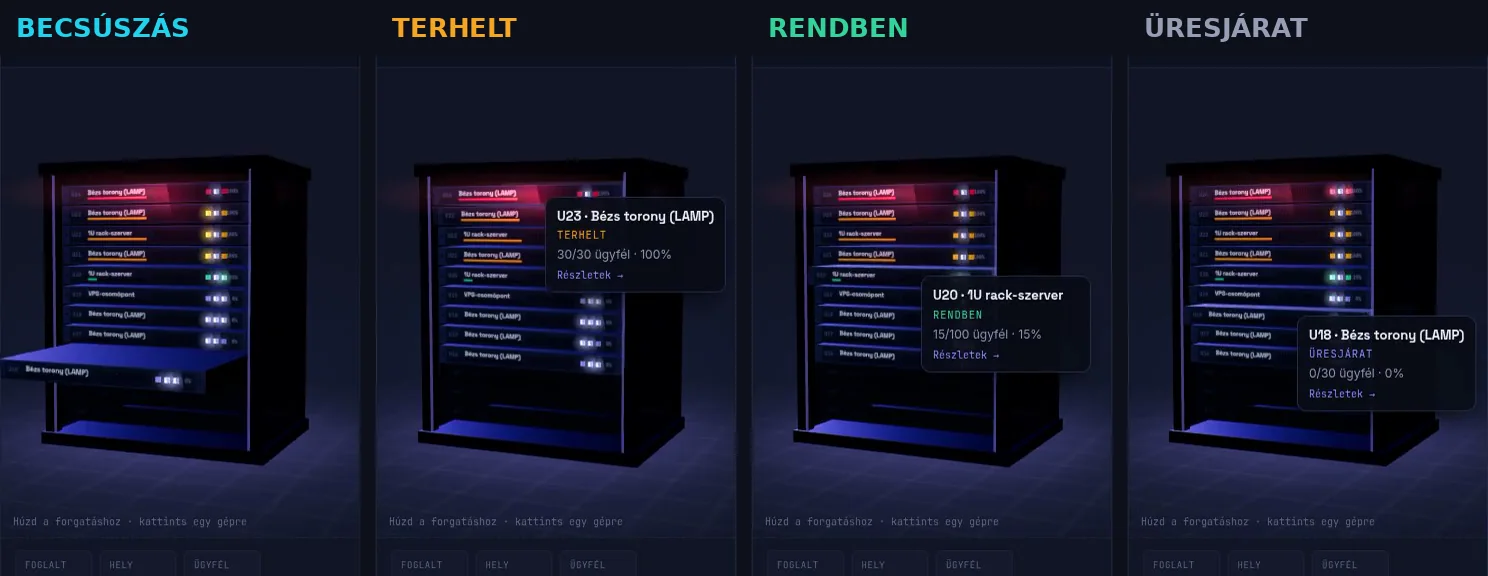
Cubes from the recording: on the left, a machine sliding in, then three pointers to three states.
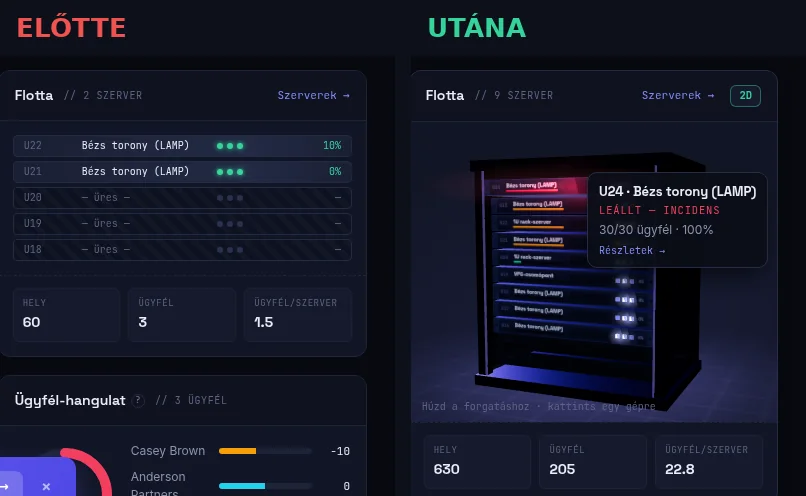
On the left, the old Fleet panel, full of empty lines. On the right, the 3D rack with the player's nine real machines. The pointed machine's data sheet: stopped, incident, 30/30 clients.
Real machines, not props
You might know the principle from the previous parts: only real data can be on the screen. That's why the 3D rack isn't just a nice model, but an image of the player's real servers. All its data comes from a common model (rack-model.ts), and this is calculated by the server:
- each machine is a rack unit, from U24 at the top to a maximum of 24U at the bottom;
- the load is distributed by the same function that calculates in the game's tick;
- the state comes from the load and the running incidents: idle, okay, loaded, overloaded, stopped.
An open incident (cooling failure, DDoS, breach) "knocks over" the most loaded machine. Such a machine glows red, its LEDs flash quickly. The LEDs' flashing normally depends on the load: in idle, it's a slow "heartbeat" (0.25 Hz), on a full machine, it's about 6 flashes per second.
If you point to a machine, a data sheet opens with its name, state, and the number of clients it serves. On click, it jumps to the details of the Servers page. The camera smoothly follows the mouse and can be rotated a bit by dragging, but only within limits, so the rack can't turn its back.
The nicest detail: a newly bought machine slides into its place. The browser remembers which machines you've seen before. If there's a new one among them, it first waits for a moment, then slides into its place in 1.2 seconds. On the first visit, there's no animation, because there's nothing to compare "new" to.
Lazy loading: only when needed
The browser only loads the 3D model when you open the Fleet panel, and only if you have at least one server. If you don't have any, or if you're on the My character page, it doesn't load, so it doesn't slow down your game.
The three.js library is not small. If we were to load it on every page, it would slow down the rankings and forums as well, even though they don't have 3D content. That's why we followed three rules.
1. Only dynamic import. three.js (with a fixed version, 0.187.0) was put into a separate package that is only requested by the controller and the Servers page, and only after the first decision. According to the commit, this package is about 136 KB when compressed. The other pages don't load a single byte from it.
2. First, ask: can the machine handle it? Before loading, a small function decides whether it's worth it:
// rack3d/boot.ts (rövidítve)
if (matchMedia('(prefers-reduced-motion: reduce)').matches) return { ok: false, reason: 'reduced-motion' };
if (matchMedia('(max-width: 900px), (pointer: coarse)').matches) return { ok: false, reason: 'mobile' };
if (nav.connection?.saveData) return { ok: false, reason: 'save-data' };
if ((nav.deviceMemory ?? 8) < 4 || (nav.hardwareConcurrency ?? 8) < 4) return { ok: false, reason: 'low-power' };
const gl = canvas.getContext('webgl2', { failIfMajorPerformanceCaveat: true });
if (!gl) return { ok: false, reason: 'no-webgl' };
In order: those who requested motion reduction won't get a rotating stand. We also won't load it on mobile devices, touchscreens, in data-saving mode, or on machines with fewer than four cores or less than 4 GB of memory. Finally, if the browser can only provide software WebGL (indicated by failIfMajorPerformanceCaveat), we'll stick with 2D. We immediately release the test canvas afterwards so it doesn't occupy a GPU context.
3. The 2D fallback is not an "error message". If 3D doesn't start, the old rack made of rows remains. This is a full-fledged view: it shows the same data from the same model. There's also a "2D/3D" switch in the panel header. If someone chooses 2D once, the browser remembers it.
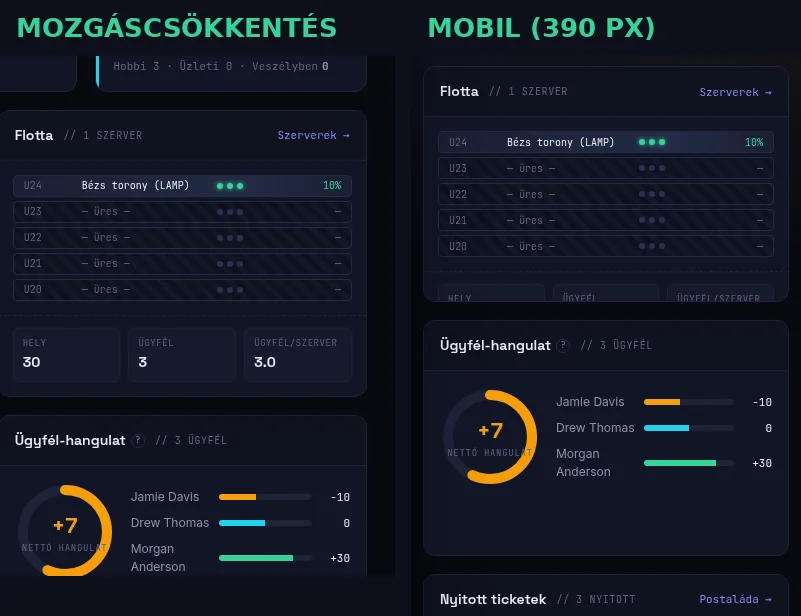
On a desktop computer with motion reduction requested and on a 390 px mobile device, three.js won't even be loaded, and the 2D rack will remain.
Economical drawing
It's also important what the 3D does when it's already running. A few rules:
- Only draw when visible. A
IntersectionObserverwatches whether the canvas is on the screen, and avisibilitychangechecks whether the page is in the foreground. If you scroll down from the panel or switch tabs, the frame cycle stops. - DPR at most 2. On a 3× phone or laptop display, the number of pixels grows with the square of the resolution. The difference between 2× and 3× is barely noticeable to the eye, but it's more than twice the work for the GPU.
- Release everything on exit. When navigating (
pagehide), every geometry, material, and texture gets adispose(), and the renderer gets aforceContextLoss(). Browsers limit how many WebGL contexts can be open at the same time. If a page doesn't release these, eventually the next page won't start. - If the GPU loses context, for example during a driver restart, the stand quietly switches back to 2D, without leaving a black rectangle.
The machine labels (e.g., "Beige tower (LAMP)") are small canvas-drawn textures. This way, the font is the same as the rest of the interface, and no 3D text rendering is needed.
Three Bugs, Three Commits
The first version of 3D was uploaded at 13:29. Then came three fixes, and all three were bugs that didn't appear on the development machine, only in real use.
1. The First Frame in the Wrong Size (13:40)
The rack was tiny at first, and only jumped to the correct size after a resize. The reason was in the order: we adjust the canvas size to the rack, but the rack was still hidden when the 3D started. The size of a hidden element is 0. The fix was to swap two lines: we make the rack visible first, and only then start the 3D.
2. Negative Frame Time (13:52)
This is the most interesting one. If you switched back to the page or the panel scrolled back into view, the camera would jerk for a moment, as if someone had nudged it.
The animation calculates how much time has passed since the previous frame (dt) and moves the camera a bit towards its target with this value. When becoming visible, we set the last timestamp to performance.now(). However, the next frame got its own requestAnimationFrame timestamp. This is the start time of the frame, which can be a fraction of a second earlier than the last. The difference became negative.
With a negative dt, the "move a bit towards the target" formula moves in the opposite direction, and the sliding machine also starts moving backwards. The first fix simply didn't allow negative values:
const realDt = Math.max(0, (now - last) / 1000);
const dt = Math.min(0.05, realDt); // egy nagy szünet után se ugorjon nagyot
3. Single Clock (14:04)
The Math.max(0, …) fix was symptomatic. The real problem was that we mixed two different clocks. The final fix: the frame time also comes from performance.now(), the same one as the last. The dt upper limit (0.05 ms) remained, so the animation wouldn't jump too much after a longer pause.
The lesson is general: when you subtract two time values, they should come from the same clock. The requestAnimationFrame timestamp and the performance.now() are on the same scale, but they don't mean the same moment.
How Did We Test It?
The rack model (states, LED frequency, which machine the incident knocks over, the 24U limit) is a pure function with its own test file. We tried the 3D in a real browser: with forced 3D (?rack3d=1) on software WebGL, and with an FPS display debug mode (?rack3d=debug). We checked the sliding on four separate frames, and the timing on a short video.
However, one issue remained: the 2D backup colors differed from the 3D ones. One showed a machine as red that the other showed as amber. We fixed this the next morning, which I'll write about in the next part.
What we've learned
- 3D should be a gift, not an admission ticket. With dynamic import and a good feature test, 3D only reaches those whose machine can handle it.
- The fallback is full view too. If 2D shows the same data from the same model, 3D can be safely omitted.
- GPU resources need to be given back.
dispose(),forceContextLoss(), and drawing only on visible canvas.- One hour, one time scale. Mixing rAF timestamp and
performance.now()can give negative time.- Measure before you draw. The size of a hidden element is 0.
In the next part: polishing. Self-hosted web fonts instead of Google Fonts, a "Waiting for decision" bar instead of a popup covering everything, a common color rule for 2D and 3D rack, and cache-friendly, content-hash-based CSS.